ChatGPT Apps 🤝 MCP
ChatGPT has been building towards an app ecosystem for a while now.
They first launched plugins in March 2023, then Custom GPTs became a thing, letting anyone create tailored versions of ChatGPT without code. This was reasonably popular with a lot of CustomGPT apps being spawned. With the rise of MCP as a USB-C for LLMs, it was only natural that ChatGPT would tap into it.
In 2025, OpenAI went all-in on MCP as the integration layer, and also going beyond just using it as a means to transmit information to the LLM, they also introduced UI paradigms allowing MCP Servers to render UI in a chat window.
With this new AppStore, there were definitely more controls baked in with well defined security policies and guidelines to build applications.
The previous iterations of the ChatGPT plugin or CustomGPTs were majorly prompt based and the actions were powered by REST APIs by providing an openAPI spec. This current iteration leverages the MCP primitives and I was very curious to understand how it worked.
Unlike the previous iterations, where the plugins were primarily read-only, going through the AppStore I was able to see quite a few everyday and popular SaaS business applications and that was interesting to me.
SaaS applications are going through a transitionary phase, they are not just system of records with CRUD APIs exposed, each company has its own business process baked into their workflows. Now with LLMs, agentic workflows have become popular. SaaS apps have rigid, defined workflows. LLMs have fluid, reasoning-based workflows. How do these two worlds meet?
So as a research experiment, I looked at some popular B2B SaaS applications and poked into their tools to see how they expose their workflows to an LLM and if there are any emerging patterns.
I expected thin API wrappers. Parameter names, maybe a line about return types. The kind of docs you skim.
I opened the Salesforce summarize_conversation_transcript tool and found this:
“CRITICAL WORKFLOW: Before calling this tool, you MUST follow these steps: 1) If call ID is not known, use the soql_query tool to query BOTH VoiceCall AND VideoCall entities in SEPARATE queries…”
It kept going. For 500 words. Output formatting rules. PII guardrails. Instructions for handling transcripts that contain “only greetings and automated system messages.”
That’s not just a tool description. That’s a system prompt hiding in plain sight.
MCP’s Three Primitives
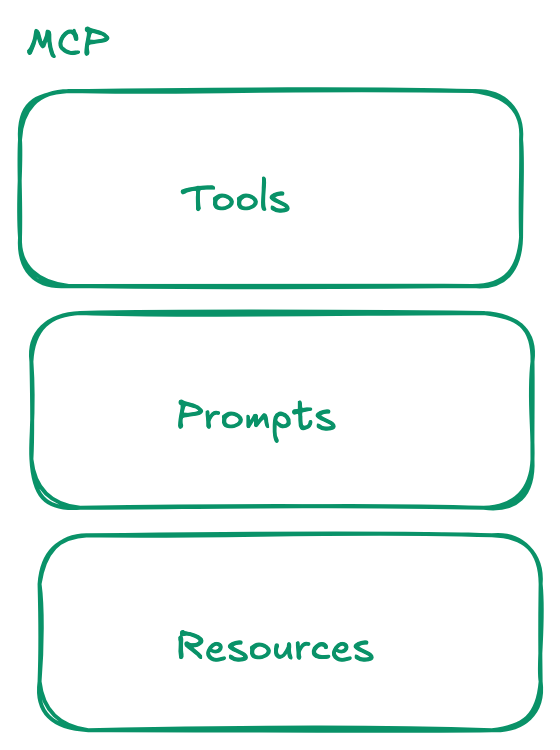
The MCP spec defines three primitives:
- Prompts - Reusable prompt templates that can be invoked by the LLM.
- Tools - Functions the LLM can call to take actions or retrieve data.
- Resources - Contextual data the LLM can read.
ChatGPT Apps primarily use only two of these.
Tools handle actions like creating records, querying data, or triggering workflows.
Resources power the UI: carousels, interactive maps, and embedded players rendered inside the chat.
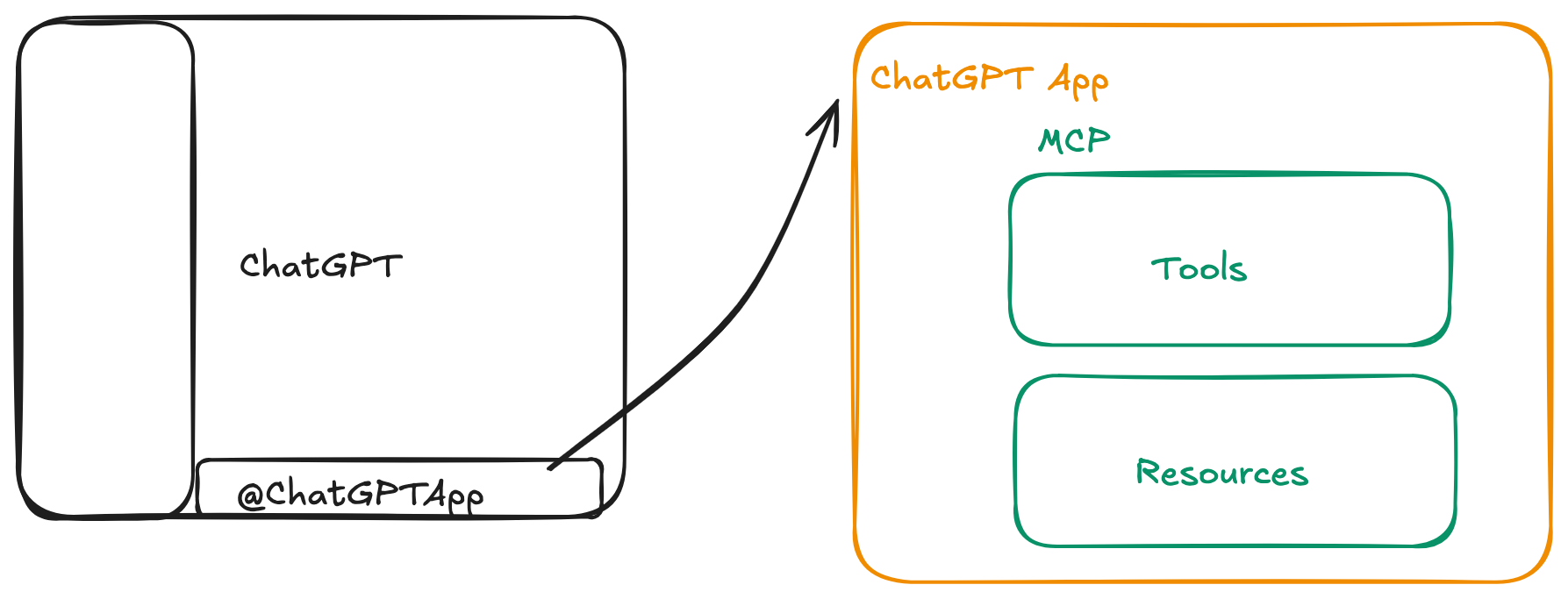
While the MCP spec includes Prompts, ChatGPT Apps currently lean almost exclusively on Tools and Resources. ChatGPT today reads the tool descriptions and decides which MCP tool to call.
So where does workflow logic go? Into the only field ChatGPT always reads: the tool description. That’s why they’re 500 words long.
The Patterns
I dug into tools from Airtable, Salesforce, Clay, Daloopa, Hex, Fireflies, and Netlify and found that tools exposed by these SaaS applications were not just CRUD operations but also had rules, workflows, prerequisites and in some cases also had PII guardrails in place.
The Apps I Looked At
Salesforce [Agentforce]
Salesforce is a CRM platform. Agentforce is their AI assistant layer.
Tool: summarize_conversation_transcript
“CRITICAL WORKFLOW: Before calling this tool, you MUST follow these steps: 1) If call ID is not known, use the soql_query tool to query BOTH VoiceCall AND VideoCall entities in SEPARATE queries…”
Enforces a 3-step prerequisite workflow before the tool can be called. Also includes output formatting rules and PII guardrails.
Airtable
Airtable is a spreadsheet-database hybrid for teams.
Tool: update_records_for_table
“To get baseId and tableId, consider using the search_bases and list_tables_for_base tools first.”
Soft prerequisite—suggests (but doesn’t force) tool chaining.
Clay
Clay is a data enrichment platform for sales teams.
Tool: find-and-enrich-contacts-at-company
“also/too/as well → ADD to existing filters
only/just → NARROW within current context
actually/instead/switch → REPLACE filters entirely
When ambiguous, ask the user”
A mini grammar for interpreting user intent across conversation turns.
Daloopa
Daloopa provides financial data extraction for analysts.
Tool: discover_companies
“1. PRIMARY: Ticker Symbol Search
2. SECONDARY: Company Name Search (only if ticker fails)
3. FALLBACK: Alternative Name Forms”“NOT: discover_companies(“Apple Inc.”)”
Tiered fallback strategy plus negative examples showing what not to do.
Hex
Hex is a collaborative data workspace for analytics.
Tool: create_thread
“The thread will take a few minutes to complete - you should warn the user about this.”
“You should check at least 10 times, or until the response has the information the user asked for.”
Async polling loop with explicit retry count and UX instructions.
Fireflies
Fireflies is a meeting transcription and note-taking tool.
Tool: fireflies_get_transcripts
“Does NOT accept transcriptId as input - use fireflies_get_transcript() multiple times to get detailed transcript content.”
Negative constraint plus tool handoff to a different tool for detailed retrieval.
Netlify
Netlify is a web deployment and hosting platform.
Tool: get-netlify-coding-context
“ALWAYS call when writing code. Required step before creating or editing any type of functions…”
A context loader—this tool doesn’t do anything except inject SDK knowledge before code generation.
It became evident that MCP tool descriptions are the orchestration layer for SaaS tools. There’s a paradigm shift here: thinking of MCPs not as API wrappers, but as a way to encode business workflows.
With the tool descriptions above, some interesting MCP patterns emerged
| Pattern | Source | What It Does |
|---|---|---|
| Prerequisite Enforcement | Airtable, Salesforce, Netlify | Forces tool chaining before execution |
| Human-in-the-Loop | Salesforce, Clay | Pauses for user confirmation mid-workflow |
| Intent Interpretation | Clay | Teaches LLM to parse follow-up queries |
| Tiered Fallback Strategies | Daloopa | Defines retry logic for failed searches |
| Negative Examples | Daloopa, Fireflies | Shows what NOT to do |
| Async Polling | Hex | Handles long-running operations |
| Context Injection | Netlify | Loads knowledge before code generation |
Prerequisite Enforcement
The Airtable update_records_for_table tool has this in its description:
“To get baseId and tableId, consider using the search_bases and list_tables_for_base tools first.”
That’s a soft prerequisite and a suggestion. Salesforce goes harder:
“CRITICAL WORKFLOW: Before calling this tool, you MUST follow these steps…”
The tool description is telling the LLM: don’t call me directly, run these other tools first.
Human-in-the-Loop
Without something like MCP’s elicitation (which isn’t widely adopted yet), how do you get user confirmation mid-workflow?
The Salesforce assign_target_to_sdr tool:
“Before calling this tool, you MUST first use the ‘query_agent_type’ tool to fetch available agents… Present the list to the user and ask which agent they want to assign the target to.”
Clay does the same thing for ambiguous searches:
“When ambiguous, ask the user to clarify”
The tool description encodes a pause point. The LLM is instructed to stop, present options, and wait for user input before proceeding.
Intent Interpretation
Clay’s find-and-enrich-contacts-at-company has a mini grammar for understanding queries and adds conditional logic based on possible intent:
IF “also/too/as well” THEN ADD to existing filters
IF “only/just” THEN NARROW within current context
IF “actually/instead/switch” THEN REPLACE filters entirely
This is teaching the LLM how to interpret user intent across turns. The tool description isn’t just about this call. It’s about how to handle the next one.
Tiered Fallback Strategies
The Daloopa discover_companies tool doesn’t just accept input. It tells the LLM how to recover from failures:
“1. PRIMARY: Ticker Symbol Search
2. SECONDARY: Company Name Search (only if ticker fails)
3. FALLBACK: Alternative Name Forms (if standard name fails)”
The LLM is expected to try multiple strategies autonomously before giving up.
Negative Examples
Daloopa also shows what NOT to do:
“NOT: discover_companies(“Apple Inc.”) or discover_companies(“Apple Incorporated”)”
Fireflies does the same:
“Does NOT accept transcriptId as input”
Negative examples are surprisingly effective. Most tool descriptions only show happy paths.
Async Polling
The Hex create_thread tool handles long-running operations:
“The thread will take a few minutes to complete - you should warn the user about this.”
“You should check at least 10 times, or until the response has the information the user asked for.”
The tool description is defining a polling loop and a UX expectation. Warn the user, then poll up to 10 times.
Context Injection
Netlify’s get-netlify-coding-context is interesting because it doesn’t do anything:
“ALWAYS call when writing code. Required step before creating or editing any type of functions…”
It’s a context loader. The tool exists purely to inject SDK documentation and code patterns into the conversation before the LLM generates code.
Takeaways
If you’re building MCP tools, here’s what I learned from dissecting these B2B apps:
Tool descriptions are runtime prompts, not documentation. The LLM reads them at execution time. Write them like you’re instructing a junior developer, not documenting an API.
Encode the workflow, not just the action. The tool descriptions tell the LLM what to do before calling the tool, what to do after, and what to do when things go wrong.
Use negative examples. Showing what NOT to do is surprisingly effective. Most tools only show happy paths. Adding anti-patterns reduces misuse.
Human-in-the-loop is a prompt pattern. Until elicitation becomes standard, you can encode pause points in your descriptions: “present options to the user and ask them to choose.”
Fallback strategies belong in the description. Don’t assume the LLM will retry intelligently. Tell it: try this first, then this, then this.
Context injection is a valid tool pattern. Sometimes a tool’s job isn’t to do something. It’s to load knowledge the LLM needs before it does something else.
I was too young to watch the HTTP spec evolve in real-time, but MCP feels like a front-row seat to something similar. And having worked as an iOS and Android developer and dealt with a few AppStores in the past, I’m curious to see how OpenAI’s version plays out.